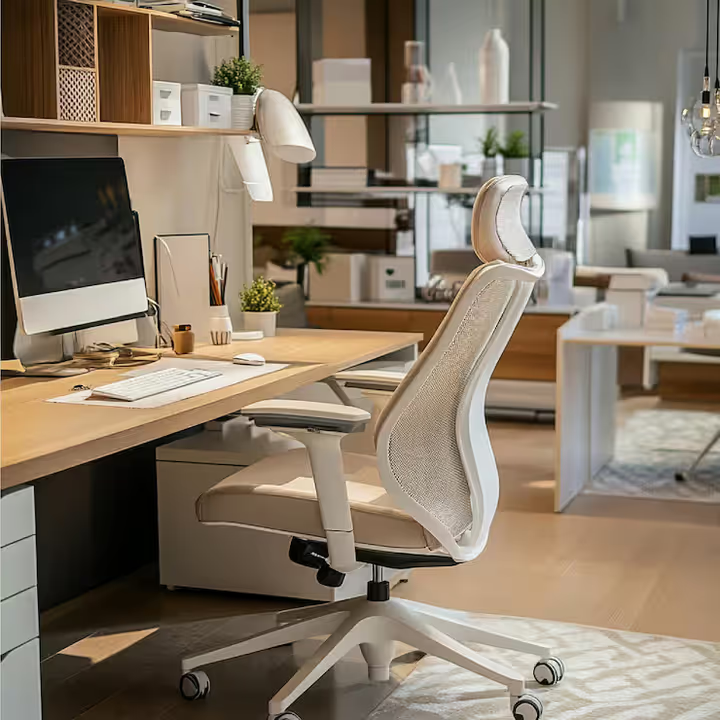
Office Ergonomic Furniture: A Complete Guide to Creating a Healthier and More Productive Workspace
A comfortable workspace is no longer considered a luxury. Whether people work from a corporate office, a home office, or a shared workspace, spending long hours sitting at a desk can affect posture, comfort, and overall well-being. Office ergonomic furniture is designed to support the body, reduce physical strain, and help people work more comfortably throughout the day.
Unlike standard office furniture, ergonomic furniture is created with human movement and body alignment in mind. Adjustable chairs, height-adjustable desks, ergonomic keyboards, monitor stands, and footrests all work together to create a workspace that adapts to the user instead of forcing the user to adapt to the furniture.
This guide explains what office ergonomic furniture is, why it matters, the essential furniture pieces to consider, and how to create an ergonomic workspace that supports both health and productivity.
What Is Office Ergonomic Furniture?
Office ergonomic furniture refers to furniture and workspace accessories designed to fit the natural posture and movements of the human body. The goal is to minimize discomfort, reduce repetitive strain, and encourage healthy positioning while working.
Ergonomics focuses on creating a work environment where furniture, equipment, and work habits support physical comfort and efficiency. Rather than maintaining one fixed posture for hours, ergonomic furniture allows users to adjust their setup according to their height, body type, and work style.
Common ergonomic furniture includes:
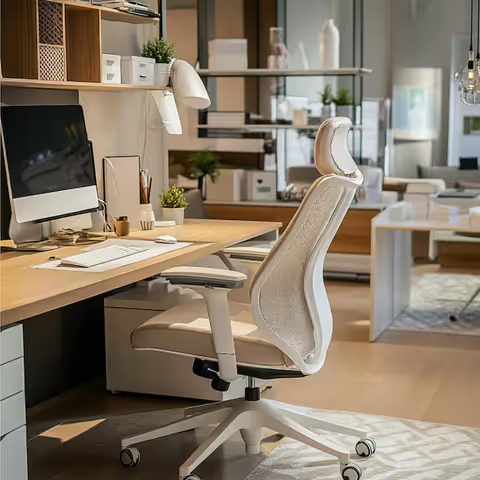
Ergonomic office chairs
Height-adjustable desks
Monitor arms and monitor stands
Ergonomic keyboards and mice
Footrests
Laptop stands
Adjustable document holders
Together, these items help create a workspace that promotes better posture and movement throughout the day.
Why Ergonomic Furniture Matters in Today's Workplace
Modern work often involves extended periods of computer use. Sitting for many hours without proper support can contribute to discomfort in the neck, shoulders, back, wrists, and hips. While ergonomic furniture cannot eliminate every physical issue, it can help reduce unnecessary strain caused by poor workspace design.
Benefits of ergonomic office furniture include:
Improved sitting posture.
Reduced pressure on the lower back and neck.
Better wrist and arm positioning while typing.
Increased comfort during long work sessions.
Support for movement and posture changes throughout the day.
Reduced workplace fatigue.
Many organizations now include ergonomic workstations as part of employee wellness initiatives, while remote workers increasingly invest in ergonomic home office setups.
Key Features of Ergonomic Office Furniture
Effective ergonomic furniture is adjustable rather than fixed. Every person's body is different, so customization is one of the most important features.
Adjustable Support
Furniture should allow users to modify height, angle, depth, and position.
Examples include:
Adjustable seat height.
Reclining backrests.
Adjustable armrests.
Height-adjustable desktops.
Tilt mechanisms.
Lumbar Support
The lower back naturally curves inward. Lumbar support helps maintain this curve while sitting, reducing unnecessary pressure on the spine.
Neutral Body Position
Ergonomic furniture encourages:
Feet flat on the floor.
Knees at approximately 90 degrees.
Elbows close to the body.
Wrists in a straight, relaxed position.
Monitor positioned at eye level.
Maintaining a neutral posture helps reduce muscle tension during work.
Ergonomic Office Chairs: The Foundation of a Healthy Workspace
An ergonomic office chair is often the most important investment in an office setup because it directly supports the spine, hips, shoulders, and arms.
Essential features to look for
Adjustable Seat Height
Users should be able to place both feet comfortably on the floor while keeping knees level with or slightly below the hips.
Lumbar Support
Good lumbar support helps maintain the natural curve of the lower back.
Seat Depth
The seat should support the thighs while leaving a small gap between the seat edge and the back of the knees.
Adjustable Armrests
Armrests should allow elbows to rest comfortably without lifting the shoulders.
Reclining Backrest
A reclining mechanism supports natural movement instead of forcing users to remain perfectly upright all day.
Who benefits most from ergonomic chairs?
Office employees.
Remote workers.
Students.
Designers and programmers.
Customer support professionals.
Anyone spending several hours at a desk.
Height-Adjustable Desks and Sit-Stand Workstations
Height-adjustable desks have become increasingly popular because they encourage movement during the workday.
Why adjustable desks are useful
Alternating between sitting and standing may help reduce the discomfort associated with remaining in one position for extended periods.
Advantages include:
Encouraging posture changes.
Supporting different working positions.
Improving monitor and keyboard height alignment.
Accommodating users of different heights.
Tips for using a sit-stand desk
Alternate between sitting and standing throughout the day.
Keep the monitor at eye level.
Keep elbows at about a 90-degree angle while typing.
Avoid standing continuously for long periods.
The goal is movement and variation rather than standing all day.
Ergonomic Desks Beyond Height Adjustment
Not every ergonomic desk needs electric height adjustment. Many desks include ergonomic features that improve comfort.
Useful desk features include:
Rounded front edges to reduce wrist pressure.
Spacious work surface for proper monitor distance.
Cable management for organized workspaces.
Adjustable keyboard trays.
Flexible monitor mounting options.
A well-designed desk supports comfortable placement of equipment without clutter.
Ergonomic Keyboard, Mouse, and Wrist Support
Hands and wrists perform repetitive movements throughout the workday. Ergonomic accessories help reduce awkward positioning.
Ergonomic Keyboard
An ergonomic keyboard encourages a more natural hand and wrist position compared to traditional flat keyboards.
Potential advantages include:
Reduced wrist bending.
Improved typing posture.
More comfortable shoulder positioning.
Ergonomic Mouse
Ergonomic mice are designed to reduce excessive wrist rotation and hand tension.
Common designs include:
Vertical mouse.
Trackball mouse.
Contoured ergonomic mouse.
Wrist Supports
Soft wrist rests may provide support during pauses in typing, though wrists should generally remain relaxed rather than constantly resting on padding while actively typing.
Monitor Placement and Ergonomic Accessories
Monitor position affects neck and eye comfort.
Ideal monitor setup
Top of the screen at or slightly below eye level.
Monitor approximately an arm's length away.
Screen directly in front of the user.
Minimal glare from windows or lights.
Helpful accessories
Monitor arms.
Monitor risers.
Laptop stands.
Document holders.
These accessories make it easier to align screens without stacking books or using temporary solutions.
Ergonomic Furniture for Home Offices
Working from home has increased the importance of creating comfortable workspaces in smaller environments.
Home office ergonomic essentials
Adjustable chair.
Proper desk height.
External keyboard and mouse for laptop users.
Laptop stand.
Footrest if needed.
Adequate lighting.
Even compact workspaces can be made ergonomic with thoughtful furniture arrangement.
Common home office mistakes
Working from the sofa for long periods.
Using dining chairs without support.
Looking down at a laptop screen all day.
Sitting with feet dangling.
Small adjustments often improve comfort significantly.
Ergonomic Furniture for Corporate Offices
Businesses increasingly design workspaces around employee well-being and flexibility.
Office ergonomic considerations
Adjustable workstations for multiple users.
Chairs with individual adjustments.
Meeting room seating with lumbar support.
Shared standing desks.
Quiet focus spaces with ergonomic furniture.
Flexible furniture also supports hybrid workplaces where different employees use the same desk throughout the week.
How Ergonomic Furniture Supports Productivity
Comfort and productivity are closely connected. When workstations fit the user properly, people often spend less time adjusting their posture or dealing with discomfort.
Ergonomic workspaces may help with:
Maintaining focus during long tasks.
Reducing unnecessary physical distractions.
Supporting better typing and computer positioning.
Encouraging movement breaks.
Productivity also depends on lighting, screen placement, work habits, and regular breaks, making ergonomics one part of a complete workspace strategy.
Choosing the Right Ergonomic Furniture
Selecting ergonomic furniture involves considering both body measurements and work habits.
Chair selection checklist
Adjustable height.
Lumbar support.
Adjustable armrests.
Comfortable seat depth.
Breathable materials.
Stable base with smooth mobility if needed.
Desk selection checklist
Suitable height.
Enough workspace.
Space for monitor placement.
Keyboard positioning flexibility.
Cable organization.
Workspace accessory checklist
Monitor positioned correctly.
External keyboard and mouse if using a laptop.
Foot support if feet do not reach the floor.
Good lighting to reduce eye strain.
Choosing adjustable furniture provides greater flexibility as needs change over time.
Recent Trends in Office Ergonomic Furniture
Workplace furniture continues evolving as hybrid work and employee wellness become larger priorities.
Smart ergonomic furniture
Some desks now include programmable height settings, allowing users to switch between preferred sitting and standing positions.
Sustainable materials
Manufacturers increasingly use recycled materials, responsibly sourced wood, and durable fabrics to reduce environmental impact.
Modular office furniture
Modular desks and storage systems allow offices to adapt layouts for collaborative and individual work.
Hybrid workspace design
Furniture designed for both home and office use has become more common, emphasizing compact designs and multi-purpose functionality.
These trends reflect growing attention to comfort, flexibility, and long-term usability.
Common Ergonomic Mistakes to Avoid
Even quality ergonomic furniture works best when adjusted properly.
Frequent setup mistakes include:
Chair positioned too high or too low.
Monitor placed below eye level.
Keyboard positioned too far away.
Sitting without back support.
Remaining in one posture for several hours.
Ignoring movement breaks.
Taking short breaks to stand, stretch, or walk complements an ergonomic workspace and supports healthy movement during the day.
Simple Ergonomic Workspace Setup Tips
Creating an ergonomic workstation does not require a complete office redesign.
Follow these practical steps:
Adjust chair height so feet rest flat on the floor.
Position the monitor directly in front of you at eye level.
Keep elbows close to the body while typing.
Use lumbar support to maintain natural spinal alignment.
Place frequently used items within easy reach.
Alternate sitting and standing if possible.
Take regular movement and stretching breaks throughout the workday.
These adjustments help create a workspace that feels more comfortable during extended computer use.
The Future of Ergonomic Office Furniture
As workplaces continue changing, ergonomic furniture is becoming more adaptable, personalized, and technology-friendly. Future office furniture is expected to focus on flexibility, adjustable configurations, improved sustainability, and designs that support different work styles across offices and home environments.
The emphasis is shifting from simply providing office furniture to creating workspaces that encourage healthy posture, movement, comfort, and long-term usability. Whether someone works remotely, in a traditional office, or in a hybrid environment, ergonomic furniture plays an important role in supporting a workspace that is both comfortable and functional.
Conclusion
Office ergonomic furniture is designed to help people work more comfortably by supporting natural posture, reducing unnecessary strain, and adapting to individual body needs. An ergonomic workspace is not built around a single chair or desk but around how every piece of furniture works together to support healthy movement and proper alignment.
Choosing adjustable chairs, ergonomic desks, monitor supports, keyboards, and other workspace accessories can improve comfort during daily work while encouraging better posture and workspace organization. Combined with regular movement and thoughtful workstation setup, ergonomic office furniture helps create an environment that supports productivity, comfort, and long-term workplace well-being.